This is the multi-page printable view of this section. .
Advanced
- 1: Multi-language support
- 2: Search
- 3: Versioning
- 4: Apache ECharts
- 5: Infographics with AntV
- 6: Comments with giscus
- 7: Analytics, user feedback, and SEO
- 8: Repository links and page information
- 9: AI-agent support
- 10: Print support
These capabilities extend the core authoring workflow: multilingual routing, search, version navigation, ECharts, infographics, comments, analytics, repository actions, AI-agent discovery, and print output. Enable only the features that match the site’s audience, accessibility needs, privacy boundary, and operating environment.
1 - Multi-language support
OINK uses Hugo’s multilingual page model rather than site-specific domain or
template assumptions. The included site makes English the primary language, and
Simplified Chinese (zh) the second language.
Configure languages
Define the default language and every enabled language in hugo.yaml:
defaultContentLanguage: en

languages:
  en:
    label: English
    locale: en-US
    weight: 1
    title: Product Documentation
    params:
      description: Product guides and reference
  zh:
    label: 简体中文
    locale: zh-CN
    weight: 2
    title: 产品文档
    params:
      description: 产品指南与参考资料
      time_format_default: 2006年1月2日
      time_format_blog: 2006年1月2日
weight controls both language ordering and the selector order. label is
shown in that language’s own script. locale supplies standards-friendly
language tags for HTML, alternate links, and Open Graph metadata.
Language-specific parameters override global values; other parameters inherit their global value. Put translated menus under each language when labels differ.
Organize translated content
The Oink project site colocates translations:
content/docs/
├── install.md
└── install.zh.md
The base name makes the files translations of one page. Keep dates, weights, aliases, resources, and route-affecting metadata aligned unless a deliberate language-specific difference is required.
Translate all visible text, including front matter titles and descriptions, summaries, menu labels, tags, image alternatives, callouts, and shortcode arguments. Preserve commands, identifiers, configuration keys, filenames, URLs, and product names.
Sites with very large independently maintained language trees may use Hugo’s
language-specific contentDir model instead. Do not mix layouts casually: pick
one model, document it, and verify how Hugo associates translations.
Keep heading links stable
Automatic heading IDs depend on the heading text, so translated headings would normally break shared fragment links. Use the English page’s actual rendered ID as an explicit ID in the translation:
## Configure local search## 配置本地搜索 {#configure-local-search}Inspect rendered HTML rather than guessing. Inline HTML, punctuation, badges, and shortcodes can affect Hugo’s generated ID. Corresponding pages should have the same heading order and rendered ID list.
Language selector behavior
The selector is generated from Hugo’s configured sites and page translations. It is hidden for a single language. With two or more languages it renders one consistent language button: a direct click advances to the next language by configured weight, while hovering for half a second or focusing the control reveals the complete language menu.
For each target language, the selector links to the current page’s translation
when it exists. If it does not exist, it links to that language’s home page
instead of producing a dead or falsely translated route. The current language
has visible and aria-current state.
SEO and document metadata
Every page emits:
- the correct HTML
langanddirvalues; - its canonical URL;
rel="alternate"links withhreflangfor configured languages;- Open Graph locale and alternate-locale metadata.
Alternate targets follow the same translated-page-or-language-home fallback as
the visible selector. Use a correct production baseURL; subpath deployments
are supported and must not be replaced by hardcoded absolute paths in layouts.
Right-to-left languages
Set direction: rtl on an RTL language:
languages:
  ar:
    label: العربية
    locale: ar
    direction: rtl
    weight: 4
The theme loads its committed local Bootstrap RTL artifact and uses logical CSS properties in its own shell. LTR and RTL sites use the same command:
hugo --gc --minifyConsumer sites do not install RTLCSS, PostCSS, or npm. Test actual RTL content, navigation, code, tables, diagrams, and mixed-direction strings rather than assuming stylesheet selection is sufficient.
UI translation bundles
Theme UI strings live in i18n/. OINK includes English, Simplified Chinese,
Traditional Chinese, and other inherited bundles. A site can override only the
strings it needs by creating its own i18n/<language>.yaml; remaining values
fall back to the theme bundle.
During translation work, run:
hugo server --printI18nWarningsContribute generally useful translations to the theme. Keep product-specific language in the site bundle.
Search by language
With offlineSearch: true, OINK generates a separate same-origin index for each
language. The Simplified Chinese index uses the theme’s CJK fallback. Search
results stay within the active language.
Verify that both offline-search-index.en.json and
offline-search-index.zh.json are generated, contain the expected pages, and
resolve under the deployed baseURL.
Translation checklist
- Every source page in the supported scope has a
.zh.mdpeer. - Front matter identity and route metadata match.
- Visible prose, UI strings, alternative text, and metadata are translated.
- Every translated Markdown heading has an explicit stable ID.
- English and Chinese rendered heading ID lists match.
- Internal links and fragments resolve in both languages.
- Navigation, breadcrumbs, previous/next links, and search stay in language.
- Dates, punctuation, spacing, and technical terminology follow the target language’s editorial conventions.
- The production build emits correct canonical and alternate metadata.
For Hugo’s underlying model, see Multilingual mode.
2 - Search
OINK’s default and recommended search is local. Hugo generates a per-language index; the theme serves Lunr and its CJK fallback from same-origin assets. The site can build and search without a public crawler, external account, CDN, or network connection.
Google Custom Search and Algolia DocSearch remain compatible online integrations. They are disabled by default and should be enabled only when the site accepts their external requests, indexing, availability, and privacy boundaries.
Only one search implementation can be active at a time.
Local search with Lunr
Enable local search in hugo.yaml:
params:
  offlineSearch: true
Do not configure gcs_engine_id or params.search.algolia at the same time.
After a production build, the output contains one index per language, for
example:
offline-search-index.en.json
offline-search-index.zh.json
The browser loads the active language’s index and displays results without leaving the page. Chinese content uses OINK’s CJK fallback instead of depending on whitespace tokenization.
Build the index before testing
Run a normal build before starting a preview:
hugo --gc
hugo server --disableFastRender
If the server was already running when the index changed, restart it. On a
subpath deployment, confirm that the browser requests the index under the
configured baseURL rather than from the domain root.
Configure result summaries and limits
Set the summary length and maximum result count:
params:
  offlineSearch: true
  offlineSearchSummaryLength: 120
  offlineSearchMaxResults: 12
Choose limits that keep the search dialog responsive on mobile devices. The summary is a discovery aid, not a replacement for a well-written page description.
Exclude a page
Set exclude_search: true in page front matter:
---
title: Internal index
exclude_search: true
---
Use this for utility, duplicate, generated, or test pages. Do not exclude a page only because its current translation is incomplete; fix the translation instead.
Style the result panel
The result panel grows with its content. A site can constrain it in
assets/scss/_styles_project.scss:
.td-offline-search-results {
  max-width: 46rem;
}
Preserve keyboard focus, visible selection, mobile width, and dark-mode contrast when overriding search styles.
Search entry points
OINK exposes search from the branded shell and can also show a sidebar input. To hide the sidebar input while retaining the main search entry, configure:
params:
  ui:
    sidebar_search_disable: true
The shell’s open and close controls expose their dialog relationship and state to assistive technology. A custom implementation must preserve those semantics.
Multilingual search
Search stays in the active language. Verify that:
- every published language has its own index;
- translated titles, descriptions, and body text appear in that index;
- a result URL contains the correct language prefix;
- English results do not replace Chinese results through content fallback;
- the language selector on a result page reaches the corresponding translation or the documented language-home fallback.
For Chinese search failures, inspect the generated Chinese JSON before changing tokenization. A missing or English-only index is usually a content or build configuration problem.
Google Custom Search (optional)
Google Custom Search Engine (GCSE) searches a public site through Google’s index. It requires a deployed, crawlable production site and sends queries to a third-party service.
After creating an engine in Google Programmable Search, add a search result page:
---
title: Search results
layout: search
---
Then configure its engine ID:
params:
  gcs_engine_id: YOUR_ENGINE_ID
  offlineSearch: false
The Google search dark-mode compatibility layer is opt-in. Import it from the
consuming site’s assets/scss/_styles_project.scss when GCSE is enabled:
@import 'td/gcs-search-dark';Create a translated result page for every supported language and use a
language-appropriate engine configuration when needed. Removing gcs_engine_id
disables GCSE.
Document the external request and privacy implications in the consuming site’s policy. GCSE is not available in an air-gapped deployment.
Algolia DocSearch (optional)
Algolia DocSearch provides a hosted crawler and interactive result panel for eligible public documentation sites. Obtain the project’s application ID, search API key, and index name, then configure:
params:
  offlineSearch: false
  search:
    algolia:
      appId: YOUR_APP_ID
      apiKey: YOUR_SEARCH_API_KEY
      indexName: YOUR_INDEX_NAME
Use a search-only public key, never an administrative key. Keep crawler rules, language facets, index updates, and external-service disclosure with the site configuration. This integration is intentionally separate from the local-first default.
The theme partials layouts/_partials/algolia/head.html and
layouts/_partials/algolia/scripts.html can be overridden for a site-specific
integration. An empty override disables that theme partial.
Custom search
If none of the supported choices fits, a site can replace the search input, result behavior, and styles. Reuse the shell’s dialog and accessibility contracts where possible. Keep custom code at the site layer unless it is provider-neutral and reusable across multiple products.
A custom online provider must be opt-in and document its network, privacy,
indexing, failure, and offline behavior. A custom local provider must publish
all runtime assets from the site or theme and respect language and baseURL
boundaries.
3 - Versioning
Depending on your project’s releases and versioning, you may want to let your users access previous versions of your documentation. How you deploy the previous versions is up to you. This page describes the Oink features that you can use to provide navigation between the various versions of your docs and to display an information banner on the archived sites.
Adding a version drop-down menu
If you add some [params.versions] in hugo.toml/hugo.yaml/hugo.json, the
Oink adds a version selector drop-down to the navbar. You specify a URL and a
name for each version you would like to add to the menu, as in the following
example:
# Add your release versions here
[[params.versions]]
  version = "master"
  url = "https://master.kubeflow.org"

[[params.versions]]
  version = "v0.2"
  url = "https://v0-2.kubeflow.org"

[[params.versions]]
  version = "v0.3"
url = "https://v0-3.kubeflow.org"params:
versions:
- version: master
url: 'https://master.kubeflow.org'
- version: v0.2
url: 'https://v0-2.kubeflow.org'
- version: v0.3
url: 'https://v0-3.kubeflow.org'{
"params": {
"versions": [
{
"version": "master",
"url": "https://master.kubeflow.org"
},
{
"version": "v0.2",
"url": "https://v0-2.kubeflow.org"
},
{
"version": "v0.3",
"url": "https://v0-3.kubeflow.org"
}
]
}
}Remember to add your current version so that users can navigate back!
The default title for the version drop-down menu is Releases. To change the
title, change the site parameter version_menu in
hugo.toml/hugo.yaml/hugo.json:
[params]
version_menu = "Releases"params:
version_menu: Releases{
"params": {
"version_menu": "Releases"
}
}If you set the version_menu_pagelinks parameter to true, then links in the
version drop-down menu point to the current page in the other version, instead
of the main page. This can be useful if the document doesn’t change much between
the different versions. Note that if the current page doesn’t exist in the other
version, the link will be broken.
You can also configure individual menu entries:
- Use
nameinstead ofversionwhen the menu label is not a version number. - Set
nameto---to add a menu separator. - Omit
urlto render a disabled text item, such as a group heading. - Set
kindto add a kind-specific class for styling. For details, see Navigation and menus. - Set
pagelinks: falseon an entry to link to that version’s main URL even when the globalversion_menu_pagelinksparameter istrue.
For example:
params:
  version_menu: v1.2
  version_menu_pagelinks: true
  versions:
    - name: '**Versions**'
    - version: v1.3-dev
      kind: next
      url: https://next.example.com
    - version: v1.2
      kind: latest
      url: https://docs.example.com
    - name: ---
    - name: Preview variant
      kind: home
      pagelinks: false
      url: https://preview.example.com
To learn more about Oink menus, see Navigation and menus.
Displaying a banner on archived doc sites
If you create archived snapshots for older versions of your docs, you can add a note at the top of every page in the archived docs to let readers know that they’re seeing an unmaintained snapshot and give them a link to the latest version.
For example, see the archived docs for Kubeflow v0.6:
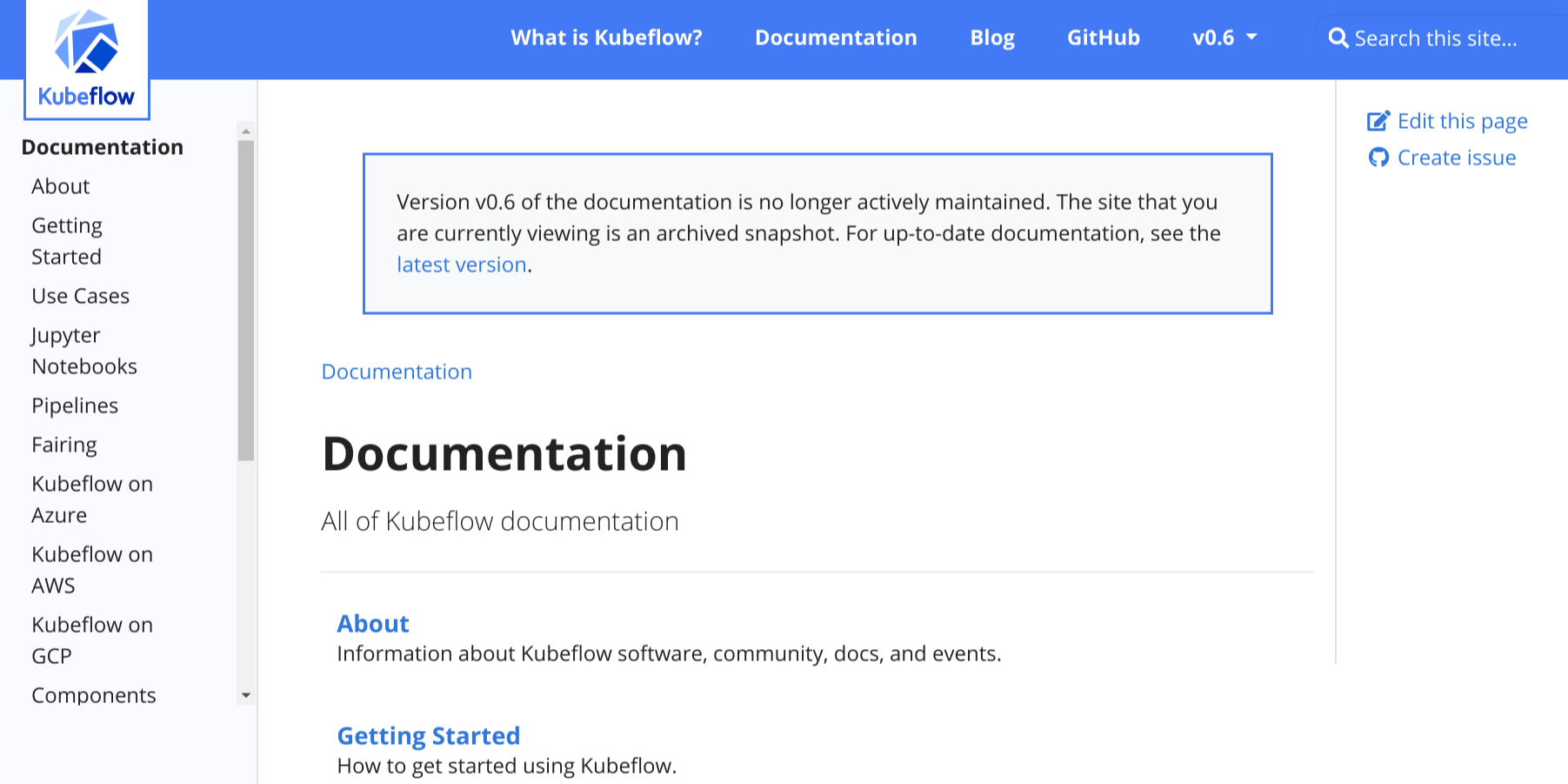
To add the banner to your doc site, make the following changes in your
hugo.toml/hugo.yaml/hugo.json file:
-
Set the site parameter
archived_versiontotrue:[params] archived_version = trueparams: archived_version: true{ "params": { "archived_version": true } } -
Set the site parameter
versionto the version of the archived doc set. For example, if the archived docs are for version 0.1:[params] version = "0.1"params: version: 0.1{ "params": { "version": "0.1" } } -
Make sure that site parameter
url_latest_versioncontains the URL of the website that you want to point readers to. In most cases, this should be the URL of the latest version of your docs:[params] url_latest_version = "https://your-latest-doc-site.com"params: url_latest_version: https://your-latest-doc-site.com{ "params": { "url_latest_version": "https://your-latest-doc-site.com" } }
4 - Apache ECharts
The echarts shortcode renders an Apache ECharts options object with the
versioned runtime bundled by Oink. Hugo parses JSON or YAML at build time,
serializes the result into the page, and loads ECharts only on pages that use
the component.
Use ECharts for quantitative charts whose axes, encodings, tooltips, or series need more control than a diagram or table provides. Keep a nearby textual summary so the conclusion does not depend on color, pointer interaction, or JavaScript.
Quick start
{{< echarts height="300px" >}}
xAxis:
  type: category
  data: [Draft, Review, Publish]
yAxis:
  type: value
series:
  - type: bar
    data: [12, 9, 4]
{{< /echarts >}}
The example shows 12 draft pages, nine pages in review, and four pages ready to publish.
How Oink loads a chart
The shortcode creates a unique chart container and stores the parsed options in
an application/json element. The page includes the local ECharts runtime and
Oink initializer once, even when it contains several charts.
If theme is not set, Oink initializes the chart for the current site color
mode and redraws it when the reader changes modes. A ResizeObserver resizes
the chart with its container. Setting an explicit ECharts theme opts out of
automatic site-theme switching for that chart.
Shortcode parameters
| Parameter | Default | Behavior |
|---|---|---|
height |
400px |
Accepts a nonnegative number with px, rem, em, vh, vw, or % |
theme |
unset | Uses a named ECharts theme; when unset, follows the site’s light or dark color mode |
full |
false |
Set to true to remove Oink’s normal content-width clamp |
Invalid height values fail the Hugo build. The shortcode body must decode to an ECharts options object; malformed JSON or YAML also fails at build time instead of creating a blank chart silently.
Choose a guide
- Chart gallery demonstrates datasets, bars, lines, areas, pies, scatter plots, legends, and visual encodings.
- Callbacks and trusted code explains formatter functions,
data-dependent styles, the
$fn:namebridge, and its security boundary.
Start with declarative JSON or YAML. Add JavaScript callbacks only when the ECharts option cannot be expressed as data.
Authoring checklist
- State the chart’s conclusion and data scope in prose.
- Label axes, units, series, and time ranges explicitly.
- Do not use color as the only way to distinguish important values.
- Keep legends and tooltips readable in both site color modes.
- Test the chart at narrow widths and with long translated labels.
- Prefer a shared
datasetwhen several series use the same records. - Record the data source and observation date for nonillustrative data.
- Avoid animation when it does not help comprehension, and respect reduced motion for custom effects.
Further reference
OINK documents its wrapper and delivery behavior; the full options schema
belongs to Apache ECharts. Use the
ECharts concepts handbook,
dataset guide, and
option reference for chart-specific
settings. The theme’s VENDOR.json records the exact runtime version and
license shipped by a release.
4.1 - ECharts gallery
These examples use only structured YAML. They require no callback code and therefore stay within the simplest ECharts authoring and review boundary. The numbers are illustrative.
Reuse a dataset
ECharts dataset keeps records separate from their visual encoding. Series can
refer to dimensions by name, which is easier to review than repeating parallel
arrays.
Bar chart from a dataset
{{< echarts height="320px" >}}
dataset:
  source:
    - [stage, minutes]
    - [Draft, 18]
    - [Review, 11]
    - [Publish, 4]
xAxis: { type: category }
yAxis: { type: value, name: Minutes }
series:
  - type: bar
    encode: { x: stage, y: minutes }
{{< /echarts >}}
The example shows the median duration falling from 18 minutes for drafting to four minutes for publication.
Line and area comparison
Use a shared category axis when several series describe the same intervals. The area fill emphasizes volume; the lines preserve the individual trends.
{{< echarts height="340px" >}}
tooltip: { trigger: axis }
legend: { data: [English, Chinese] }
xAxis:
  type: category
  data: [Mon, Tue, Wed, Thu, Fri]
yAxis: { type: value, name: Pages }
series:
  - name: English
    type: line
    smooth: true
    areaStyle: { opacity: 0.12 }
    data: [5, 8, 7, 11, 13]
  - name: Chinese
    type: line
    smooth: true
    areaStyle: { opacity: 0.12 }
    data: [4, 6, 8, 9, 13]
{{< /echarts >}}
Both language queues reach 13 reviewed pages on Friday; the Chinese queue catches up after starting one page lower.
Donut breakdown
A donut works for a small part-to-whole comparison. Keep the categories few, show labels directly, and provide the totals in text.
{{< echarts height="340px" >}}
tooltip: { trigger: item }
legend: { bottom: 0 }
series:
  - name: Documentation pages
    type: pie
    radius: [42%, 68%]
    avoidLabelOverlap: true
    label: { formatter: "{b}: {c}" }
    data:
      - { name: Guides, value: 28 }
      - { name: Reference, value: 17 }
      - { name: Tutorials, value: 11 }
      - { name: Concepts, value: 8 }
{{< /echarts >}}
The 64-page set contains 28 guides, 17 reference pages, 11 tutorials, and eight concept pages.
Scatter plot with visual encoding
visualMap can encode a third dimension without callback code. The following
plot maps build size to point size and build status to color.
{{< echarts height="360px" >}}
tooltip: { trigger: item }
xAxis: { type: value, name: Build seconds }
yAxis: { type: value, name: Pages }
visualMap:
  - type: continuous
    dimension: 2
    min: 10
    max: 50
    inRange: { symbolSize: [10, 32], color: ["#60a5fa", "#f97316"] }
    right: 0
    top: middle
series:
  - type: scatter
    encode: { x: 0, y: 1, tooltip: [0, 1, 2] }
    data:
      - [1.8, 24, 12]
      - [2.6, 41, 22]
      - [3.9, 67, 35]
      - [5.1, 92, 48]
{{< /echarts >}}
Larger sites take longer to build in this illustrative sample; point size and color both encode the third value so color is not the only cue.
Production notes
Keep example data close to the chart only when it is small and editorial. For larger or generated datasets, produce the options during the site’s content pipeline and review the resulting page source. Oink does not fetch chart data from a remote endpoint automatically; adding a network request is an explicit site integration and changes the local-first and privacy boundary.
4.2 - ECharts callbacks and trusted code
Most ECharts options should remain declarative JSON or YAML. Some valid options,
including custom formatters and data-dependent styles, require functions. Oink
supports those cases through fenced JavaScript blocks and $fn:name references.
Trusted-author boundary
Callback code runs in every visitor’s browser with the page’s origin and normal JavaScript privileges. Oink safely serializes structured chart options, but it does not sandbox author-supplied callbacks. Only trusted project authors should add or review them.
Callbacks can also change a site’s Content Security Policy requirements because the shortcode emits an inline registration script. Prefer declarative options when they can express the same behavior.
Register and reference functions
Place one or more js or javascript fences inside the shortcode. Declare each
function with a named var, let, const, or function declaration, then refer
to it from YAML or JSON as $fn:name.
{{< echarts height="320px" >}}
```js
var formatMinutes = function (value) {
  return value + ' min';
};
```

```yaml
yAxis:
  type: value
  axisLabel: { formatter: $fn:formatMinutes }
```
{{< /echarts >}}
Oink removes the JavaScript fences before parsing the remaining options,
registers the named functions, and replaces $fn:name values before calling
chart.setOption().
Example: labels and colors
The following chart formats duration labels and highlights the slowest stage. Its data says writing takes 18 minutes, review takes 11, and publication takes four.
Callback checklist
- Keep functions deterministic and limited to chart presentation.
- Do not read cookies, credentials, storage, or unrelated page content.
- Do not fetch remote data from a formatter or style callback.
- Use a unique, descriptive function name on pages with several charts.
- Treat code copied from an external example as source code that requires review and license checking.
- Exercise callbacks with missing, null, string, and numeric values as appropriate.
- Test both site color modes, narrow layouts, printing, and reduced motion.
Troubleshooting
If a $fn:name value remains unresolved, verify that the spelling matches a
named declaration inside the same page and that the fence language is js or
javascript. Anonymous expressions that are not assigned to a name cannot be
registered.
If Hugo fails before rendering, reduce the body to valid JSON or YAML first, then add one callback. A browser console error means the structured options parsed successfully but callback execution or an ECharts option still needs inspection.
5 - Infographics with AntV
The infographic shortcode renders the AntV Infographic DSL with the versioned
runtime bundled by Oink. Use it for processes, timelines, cycles, funnels,
roadmaps, and compact visual summaries where a statistical chart would be too
literal.
The DSL is serialized as data, not inserted as arbitrary HTML or executable code. The browser runtime turns it into SVG and loads only on pages that use the shortcode.
Quick start
{{< infographic >}}
infographic list-row-simple-horizontal-arrow
data
  title Documentation workflow
  items
    - label Draft
      desc Write the first version
    - label Review
      desc Check facts and language
    - label Publish
      desc Build and verify the site
{{< /infographic >}}
The same three steps appear below. Drafting creates the first version, review checks facts and language, and publication builds and verifies the site.
Syntax anatomy
An infographic normally contains:
infographic TEMPLATE, which selects a built-in AntV template;- a
datablock with an optionaltitleanddesc; - an
itemslist withlabel,desc, optionalvalue, and optional nestedchildrenfields; - an optional
themeblock for a built-in theme or explicit colors.
Indentation defines structure. Keep labels short, use descriptions for context, and choose a template whose visual relationship matches the prose. A decorative sequence is not a substitute for an actual hierarchy or comparison.
Shortcode parameters
| Parameter | Default | Behavior |
|---|---|---|
height |
auto |
Accepts auto or a nonnegative number with px, rem, em, vh, vw, or % |
full |
false |
Set to true to remove Oink’s normal content-width clamp |
Invalid height values and an empty DSL body fail the Hugo build. DSL schema or template errors are reported by the browser runtime in the infographic container.
AntV themes belong to the DSL rather than the shortcode parameters. They do not automatically follow Oink’s site color mode, so verify foreground, background, and surrounding-page contrast in both modes.
Choose a guide
- Processes, timelines, and cycles demonstrates three common ways to explain a sequence.
- Layouts, funnels, and themes demonstrates grids, narrowing stages, template selection, and a built-in hand-drawn theme.
The AntV package contains many templates. Start with the smallest visual form that clarifies the relationship, not the most decorative form available.
Authoring and accessibility
- Summarize the same conclusion in ordinary text before or after the graphic.
- Keep the reading order meaningful and labels concise.
- Do not use color or shape as the only carrier of status.
- Check long translated labels, narrow screens, printing, and both site color modes.
- Avoid remote image or icon identifiers in a local-first page unless their network and license boundary has been reviewed explicitly.
- Record the source and date when values are not illustrative.
SVG improves visual fidelity, but it does not guarantee that every template exposes the same semantic structure as native headings, lists, and tables. Essential instructions must remain available in adjacent prose.
Further reference
OINK documents its shortcode and delivery boundary. For the full DSL, template
gallery, and theme model, use the
AntV Infographic documentation,
gallery, and
source repository. The Oink theme’s
VENDOR.json records the exact bundled version, checksum, and MIT license file.
5.1 - Processes, timelines, and cycles
Sequence templates answer different questions. A horizontal process emphasizes ordered handoffs, a timeline emphasizes chronology, and a cycle emphasizes that the last stage feeds the first again. The surrounding prose must state which relationship matters.
Horizontal process
Use list-row-simple-horizontal-arrow for a short left-to-right sequence. On
narrow screens, keep labels brief and verify that the rendered order remains
clear.
{{< infographic >}}
infographic list-row-simple-horizontal-arrow
data
  title Documentation delivery
  items
    - label Plan
      desc Define the reader and outcome
    - label Write
      desc Draft the smallest complete page
    - label Review
      desc Check facts, language, and links
    - label Ship
      desc Build and verify the hosted route
{{< /infographic >}}
The process moves from planning through writing and review to a separately verified hosted result.
Chronological timeline
Use sequence-timeline-simple when time or release order is the primary
relationship.
{{< infographic >}}
infographic sequence-timeline-simple
data
  title Release evidence
  items
    - label Source ready
      desc Scope, copy, attribution, and review are complete
    - label Checks pass
      desc Theme and project-site suites pass
    - label Tag public
      desc The immutable module version resolves
    - label Site deployed
      desc Production routes pass smoke tests
{{< /infographic >}}
The timeline separates four evidence points; a passing test does not skip the public-tag or deployment stages.
Continuous cycle
Use sequence-circular-simple only when the final item genuinely returns work
to the first. Do not use a cycle for a process that has a terminal state.
{{< infographic height="480px" >}}
infographic sequence-circular-simple
data
  title Documentation maintenance loop
  items
    - label Observe
      desc Collect support and search signals
    - label Prioritize
      desc Select a reader problem
    - label Improve
      desc Update content and examples
    - label Verify
      desc Test links, rendering, and outcomes
{{< /infographic >}}
Verification produces new observations, so the maintenance loop returns to its first stage.
Selection rule
If removing the arrows or time axis would not change the meaning, use a native list or cards instead. Infographics should reveal a relationship, not decorate an otherwise unrelated set of statements.
5.2 - Infographic layouts, funnels, and themes
AntV templates combine a structure with item and title treatments. Changing the
template changes the implied relationship, so review meaning before appearance.
The examples below use flat items data and no remote icons.
Grid of grouped facts
Use list-grid-badge-card for peer facts that share one topic but have no
required order.
{{< infographic >}}
infographic list-grid-badge-card
data
  title Documentation quality gates
  items
    - label Accuracy
      desc Commands and versions match the product
    - label Coverage
      desc Required concepts and tasks are present
    - label Language
      desc English and Chinese remain equivalent
    - label Delivery
      desc The hosted route matches the reviewed source
{{< /infographic >}}
The four gates are peers. None should be drawn as a prerequisite for another.
Narrowing funnel
Use sequence-funnel-simple when each stage intentionally reduces a population.
Include value fields and repeat the numbers in prose.
{{< infographic height="460px" >}}
infographic sequence-funnel-simple
data
  title Documentation review funnel
  items
    - label Drafted
      value 40
      desc Pages submitted
    - label Fact checked
      value 34
      desc Commands and claims verified
    - label Language reviewed
      value 31
      desc English and Chinese aligned
    - label Published
      value 28
      desc Hosted pages verified
{{< /infographic >}}
Forty drafted pages become 34 fact-checked pages, 31 language-reviewed pages, and 28 verified published pages.
Built-in hand-drawn theme
Themes change styling, not data meaning. The hand-drawn theme is useful for
informal planning material; a custom primary color can still align it with the
site.
{{< infographic >}}
infographic sequence-stairs-front-simple
data
  title From notes to maintained documentation
  items
    - label Capture
      desc Record the observed behavior
    - label Explain
      desc Add context and reader intent
    - label Verify
      desc Test examples and links
    - label Maintain
      desc Assign an owner and update path
theme hand-drawn
  colorPrimary #2563eb
{{< /infographic >}}
Choose a template family
| Relationship | Useful starting templates |
|---|---|
| Ordered handoff | list-row-simple-horizontal-arrow, sequence-steps-simple |
| Chronology or roadmap | sequence-timeline-simple, sequence-roadmap-vertical-simple |
| Repeating loop | sequence-circular-simple, sequence-circle-arrows-indexed-card |
| Peer facts | list-grid-badge-card, list-grid-compact-card |
| Progressive reduction | sequence-funnel-simple, sequence-pyramid-simple |
| Hierarchy | hierarchy-tree-*, hierarchy-mindmap-* |
Template availability belongs to the bundled AntV version. Before adopting a
less common template, render it with realistic English and Chinese content and
pin the Oink release whose VENDOR.json provides it.
Layout checklist
- Keep peer labels grammatically parallel.
- Use
valueonly when it has a defined unit or meaning. - Avoid a fixed height that clips translated text.
- Use
full=trueonly when the surrounding page and print layout need it. - Verify template meaning, contrast, overflow, and reading order separately.
- Keep remote icon and image references out of network-isolated documentation.
6 - Comments with giscus
OINK supports giscus through a Hextra-compatible comments configuration
under params.comments. giscus gives each content page a comment thread backed
by GitHub Discussions and lets readers comment through GitHub OAuth.
How giscus works
When a page loads, giscus searches the configured repository for a Discussion that matches the page. If it does not find one, the giscus bot creates it when a reader submits the first comment or reaction. Maintainers moderate comments in GitHub Discussions.
Anyone can read a public thread. To comment, a reader selects Sign in with GitHub and authorizes the giscus app to post on their behalf. OINK never asks for or stores the reader’s GitHub password or access token.
giscus is an opt-in online integration. Active comment pages load a script and
iframe from https://giscus.app; they do not work in a network-isolated
runtime. Document this external boundary in the consuming site’s privacy and
security policy when required.
Prepare GitHub
Before configuring OINK:
- Use a public GitHub repository for the comment threads. Visitors cannot read Discussions in a private repository.
- Enable GitHub Discussions under the repository’s Settings > Features.
- Install the giscus GitHub App for that repository. Without the app, visitors cannot comment or react.
- Choose a Discussion category. giscus recommends an Announcements category so that only maintainers and the giscus bot can create new Discussions.
The repository ID and category ID are public identifiers, not credentials. Do not add a GitHub personal access token, OAuth secret, or password to Hugo configuration.
Generate repository settings
Open giscus.app and complete its configuration form:
- Select the interface language.
- Enter the repository as
OWNER/REPOSITORYand wait for the validation to succeed. - Select the page-to-Discussion mapping.
pathnameis OINK’s default. - Choose the Discussion category and optional features.
- Locate the generated
<script>block.
Copy these generated values into OINK configuration:
| Generated attribute | OINK key |
|---|---|
data-repo |
repo |
data-repo-id |
repoId |
data-category |
category |
data-category-id |
categoryId |
Choose a stable mapping
The mapping determines which Discussion belongs to each page. pathname is a
good default when published paths are stable and the same repository serves
multiple domains or preview environments.
Changing mapping, moving a page, or changing its permanent URL can make giscus
look for a different Discussion. Choose the mapping before collecting comments
and preserve redirects or Discussion titles during a migration. Enable strict
matching when similar page paths could otherwise select the wrong thread.
Enable comments site-wide
Add the generated identifiers to the consuming site’s hugo.yml and set
enable: true:
params:
  comments:
    enable: true
    type: giscus
    giscus:
      repo: OWNER/REPOSITORY
      repoId: REPOSITORY_ID
      category: Announcements
      categoryId: CATEGORY_ID
      mapping: pathname
      strict: 0
      reactionsEnabled: 1
      emitMetadata: 0
      inputPosition: top
      theme: auto
      loading: lazy
Replace all uppercase placeholders with the exact values generated by
giscus.app. OINK requires repo, repoId, category, and categoryId before
it renders giscus. Missing or blank required values produce a Hugo warning and
skip giscus instead of failing the build.
Configuration reference
| Key | Default | Purpose |
|---|---|---|
enable |
false |
Enables the configured comment provider globally. |
type |
giscus |
Selects giscus. Other provider names are not supported. |
repo |
— | Public repository in OWNER/REPOSITORY form. |
repoId |
— | Repository node ID generated by giscus.app. |
category |
— | GitHub Discussions category name. |
categoryId |
— | Category node ID generated by giscus.app. |
mapping |
pathname |
Maps the current page to a Discussion. |
term |
— | Supplies the term required by mappings such as specific or number. |
strict |
0 |
Uses strict Discussion-title matching when set to 1. |
reactionsEnabled |
1 |
Shows reactions for the Discussion’s main post. |
emitMetadata |
0 |
Sends Discussion metadata messages to the parent page. |
inputPosition |
top |
Places the comment editor at top or bottom. |
theme |
auto |
Follows the OINK theme, or selects a built-in/custom giscus theme. |
lang |
Page language | Overrides the automatically selected giscus interface language. |
loading |
lazy |
Defers iframe loading until the reader approaches the comments. |
ariaLabel |
Comments |
Labels the comments region for assistive technology. |
errorMessage |
Load-error text | Replaces the message shown when giscus cannot load. |
Boolean-like feature values accept YAML booleans or giscus-style 0 and 1
values.
Locale, theme, and accessible text
OINK selects the giscus locale from the active Hugo language. Simplified,
Traditional, and Hong Kong Chinese map to the corresponding giscus locales;
unsupported languages fall back to English. Set lang only when the automatic
choice is not appropriate.
With theme: auto, the iframe follows OINK’s light/dark selector and the
browser’s preferred color scheme. A built-in giscus theme name or custom theme
URL disables that automatic switch.
For a multilingual site, localize the comments-region label and load-error text under each language’s parameters. Language parameters merge with the global repository settings:
languages:
  en:
    params:
      comments:
        giscus:
          ariaLabel: Comments
          errorMessage: Comments could not be loaded.
  zh:
    params:
      comments:
        giscus:
          ariaLabel: 评论
          errorMessage: 评论加载失败。
Override one page
The comments front matter field overrides the global switch in either
direction.
Enable one page
Keep the complete repository configuration in hugo.yml, leave the global
switch off, and opt in selected pages:
---
title: Community design notes
comments: true
---
Disable one page
When comments are enabled globally, opt out pages that should remain static:
---
title: Security policy
comments: false
---
An explicit comments: false suppresses both giscus and legacy Disqus on that
page.
Coexist with Disqus
OINK keeps existing Hugo Disqus configuration compatible during migration. When valid giscus configuration is active for a page, OINK suppresses Disqus so that only one comment system renders. If giscus is enabled but its required settings are incomplete, OINK warns, skips giscus, and can leave configured Disqus as a fallback.
Remove the Disqus service configuration after the migration is complete and every intended page uses giscus.
Content Security Policy
A strict Content Security Policy must permit giscus in both script-src and
frame-src. Merge these sources into the site’s existing policy instead of
replacing its other directives:
script-src 'self' https://giscus.app;
frame-src 'self' https://giscus.app;
OINK’s initializer remains a same-origin bundled asset and is included only on
pages where giscus is active. If the external script fails or does not create an
iframe, OINK clears the loading state and exposes errorMessage in a live
status region.
Verify the integration
-
Build the site and confirm there is no missing-key warning:
hugo --minify -
Start a local preview and open a page where comments should be active:
hugo server --disableFastRender -
Confirm that the giscus iframe shows Sign in with GitHub and uses the active page language.
-
Toggle OINK between light and dark themes and confirm that the comment widget follows it when
theme: auto. -
Open a page with
comments: falseand confirm that it has no giscus or Disqus widget. -
Submit one test comment, then confirm that the expected Discussion appears in the configured category and can be moderated on GitHub.
A browser-console message saying that the Discussion was not found is expected before the first comment or reaction creates it.
Troubleshooting
- The build warns about missing keys: regenerate the configuration at giscus.app and copy all four required identifiers without renaming them.
- The widget does not appear: check
params.comments.enable,params.comments.type, the page’scommentsfront matter, and Hugo’s warning output. - GitHub sign-in or posting fails: confirm that the repository is public, Discussions are enabled, and the giscus GitHub App is installed for the repository.
- The browser blocks giscus: inspect the console and response headers, then
allow
https://giscus.appin the applicable CSP directives. - An existing thread is not found: restore the original mapping and page path, or rename/migrate the Discussion deliberately before changing the URL.
- The interface language is wrong: verify the Hugo language name and locale,
or set
params.comments.giscus.langexplicitly.
7 - Analytics, user feedback, and SEO
OINK does not contact analytics, form, comment, or advertising services by default. These integrations are site decisions: enable them explicitly, document the data boundary, and provide any consent or policy required by the site’s users and jurisdiction.
Adding analytics
Hugo provides embedded templates for analytics services. When a site configures Google Analytics, browser usage information such as page views and custom events is sent to Google. This is incompatible with a fully air-gapped runtime and may be incompatible with a strict same-origin Content Security Policy.
Setup
Obtain a Google Analytics measurement ID for the site, then use Hugo’s current service configuration:
services:
  googleAnalytics:
    id: G-YOUR-ID
Do not also set the deprecated top-level googleAnalytics key. Analytics are
normally emitted only for a production Hugo environment. Build a production
preview and inspect its HTML and browser network log before publication.
If analytics is disabled, OINK emits no Google Analytics request. Remove the configuration entirely rather than inserting a fake identifier.
User feedback
OINK can show a “Was this page helpful?” widget at the bottom of documentation pages. The widget presents Yes and No actions and then displays a configured response, usually with a link to open a documentation issue.
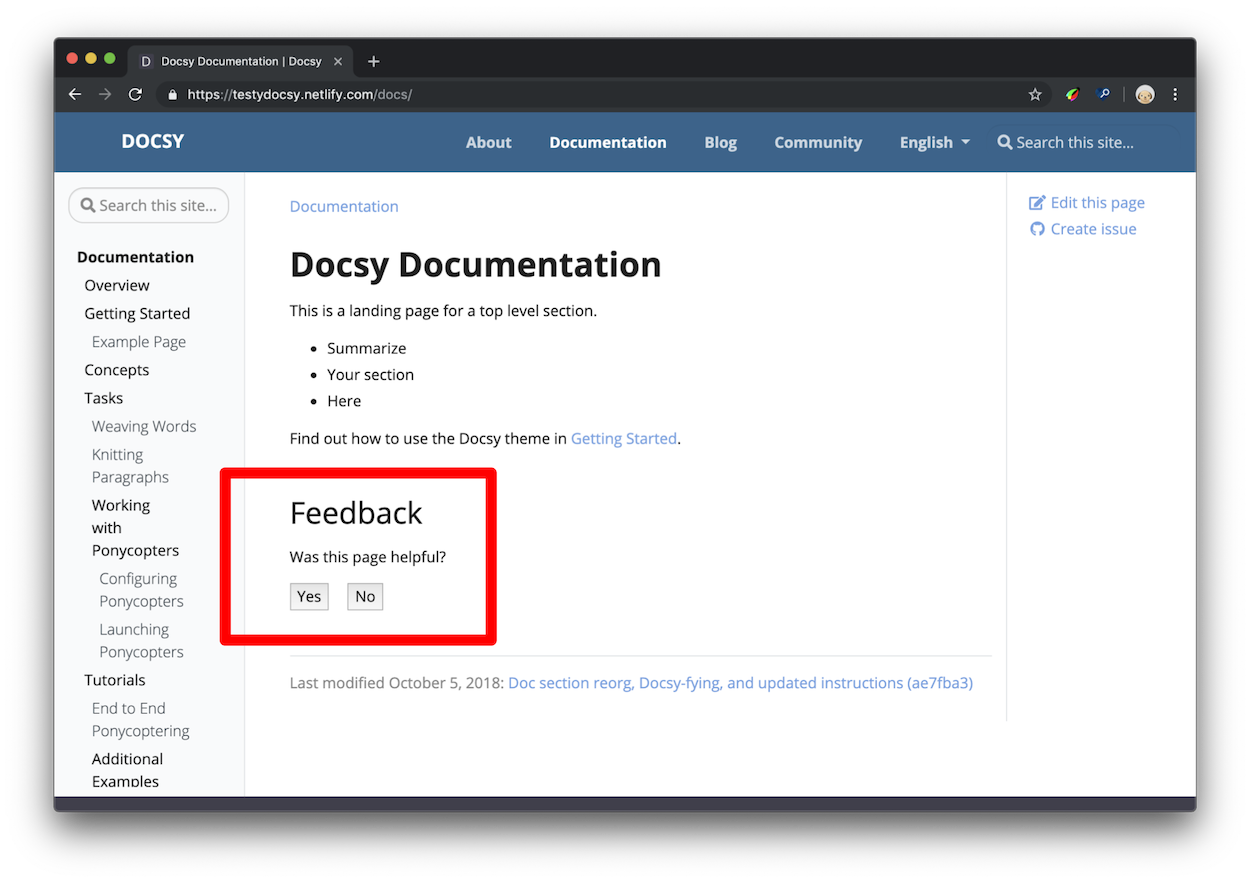
The response can remain useful without analytics: it can direct the reader to an issue template, discussion, email address, or another site-owned feedback channel. Collection and event reporting happen only when the site configures an appropriate destination.
How feedback data is useful
Combine feedback with context instead of treating one score as proof. Pages with high traffic and repeated negative feedback are useful review candidates; highly rated pages can reveal patterns worth testing elsewhere.
Make focused editorial changes when possible. For example, update one stale tutorial, or move a code example earlier on a small group of pages, then compare feedback over an appropriate period. Record releases, traffic shifts, support events, and other factors that could explain the change.
Feedback is directional evidence, not a substitute for user research, accessibility review, support data, or technical validation.
Setup
OINK keeps the widget off by default. Set the global default and configure localized responses. For English:
params:
  ui:
    feedback:
      enable: false
languages:
  en:
    params:
      ui:
        feedback:
          yes: >-
            Glad to hear it! Please <a
            href="https://github.com/OWNER/REPOSITORY/issues/new">tell us how we
            can improve</a>.
          no: >-
            Sorry to hear that. Please <a
            href="https://github.com/OWNER/REPOSITORY/issues/new">tell us how we
            can improve</a>.
For Simplified Chinese, put translated strings in languages.zh.params:
languages:
  zh:
    params:
      ui:
        feedback:
          yes: >-
            很高兴本页对你有帮助!欢迎<a
            href="https://github.com/OWNER/REPOSITORY/issues/new">告诉我们如何继续改进</a>。
          no: >-
            很抱歉本页没有解决问题。请<a
            href="https://github.com/OWNER/REPOSITORY/issues/new">告诉我们缺少什么</a>。
Visible response HTML is trusted site configuration. Keep it small, review its links, and do not interpolate untrusted values.
When Google Analytics is configured, the widget can emit a custom page_helpful
event. A positive action uses params.ui.feedback.max_value (100 by default); a
negative action uses 0.
Access feedback data
For Google Analytics, inspect the page_helpful event in the provider’s events
report and create a page-level report when needed. An absent event may mean no
interaction occurred, analytics was blocked or disabled, consent was not given,
or the selected time range is wrong.
Do not enable analytics solely to make the widget visible. A site can keep the response-and-link experience while leaving event collection disabled.
Override feedback on one page
Set feedback in page front matter. The page value overrides the global default
in either direction:
---
title: Feedback example
feedback: true
---
Use feedback: false to hide the widget on a page when the global default is
enabled. For compatibility, hide_feedback: true also hides it when feedback
is not set.
Set the default for all pages
Set the site parameter. OINK defaults it to false; set it to true only when
most documentation pages should show the widget:
params:
  ui:
    feedback:
      enable: false
Add a contact form with Fabform
Fabform and similar hosted form endpoints are optional online services. After creating an account and reviewing its data handling, a site can post a form to its assigned endpoint:
<form action="https://fabform.io/f/{form-id}" method="post">
  <label for="email">Your email</label>
  <input id="email" name="email" type="email" autocomplete="email" />
  <button type="submit">Submit</button>
</form>
Replace {form-id}, translate the visible labels, add a privacy notice, and
provide error and success states. The form will not work offline. A local or
first-party endpoint is preferable when the site must keep submissions within
its own boundary.
Search engine optimization metadata
For each page, OINK chooses the HTML meta description from the first available value:
- the page’s
descriptionfront matter field; - Hugo’s computed page summary for non-index pages;
- the site description in
params.
Write a concise, page-specific description in every language. Do not copy the English description into a Chinese page. Search metadata cannot compensate for thin, duplicated, or inaccurate content.
The theme also emits canonical and alternate-language links from Hugo’s page
translations. Use a correct production baseURL, stable translated routes, and
explicit translated heading IDs. Add other meta tags through the site’s
layouts/_partials/hooks/head-end.html override only when they are not already
provided by the theme.
See Hugo’s Google Analytics configuration, page summaries, and Google’s SEO starter guide for the underlying service and content concepts.
8 - Repository links and page information
OINK’s documentation and blog layouts can show links to the current page’s source repository:
- View page source opens the source file.
- Edit this page opens an editable source view.
- Create child page starts a new file below the current page and can use the
site’s
assets/stubs/new-page-template.mdtemplate. - Create documentation issue opens an issue against the documentation repository with page context.
- Create project issue optionally targets a separate product repository.
The built-in URL patterns target GitHub-style repositories. Verify every action when using another compatible host, and override the relevant partial for a different URL scheme.
Link configuration
A typical site configuration is:
params:
  github_repo: https://github.com/OWNER/DOCS
  github_project_repo: https://github.com/OWNER/PRODUCT
  github_branch: main
  github_subdir: site
The values can be set globally, per language, in a section cascade, or in page front matter when content comes from more than one repository.
github_repo
The documentation source repository URL. It drives view, edit, child-page, and documentation-issue links:
params:
  github_repo: https://github.com/pgsty/oink
Omit it to suppress repository-derived page actions. Do not point it at the theme repository when the page source actually lives in a consuming site.
github_subdir (optional)
Set the path from the repository root to the Hugo site source. This project
stores its site in oink.pgsty.com:
params:
  github_subdir: oink.pgsty.com
The value is a repository path, not a local absolute path and not the content directory itself unless that is the actual site root.
github_project_repo (optional)
Set a separate product repository to show Create project issue:
params:
  github_project_repo: https://github.com/OWNER/PRODUCT
Use the documentation repository for content defects and the product repository for behavior discussed by the page. If that distinction is not clear to readers, omit the second link.
github_branch (optional)
Set the branch used by source and edit URLs:
params:
  github_branch: main
This is normally the site’s source branch. It is not necessarily the deployed branch, generated Pages branch, or theme revision.
path_base_for_github_subdir (optional)
Use a section cascade when a subtree is mounted from another repository. The
path base is removed before the remaining content path is appended to
github_subdir:
---
title: Imported reference
cascade:
  github_repo: https://github.com/OWNER/UPSTREAM
  github_project_repo: https://github.com/OWNER/UPSTREAM
  github_subdir: docs
  path_base_for_github_subdir: content/reference
---
For a source page at content/reference/api/client.md, this configuration maps
the repository path to docs/api/client.md.
path_base_for_github_subdir can be a regular expression. A language-directory
site might use:
path_base_for_github_subdir: content/\w+/referenceOINK’s colocated .md / .zh.md layout normally uses the same static base for
both languages and does not need the language component in this expression.
When the source file has another name, use a from and to mapping. This
example maps a section _index.md to an upstream README.md:
path_base_for_github_subdir:
  from: content/reference/(.*?)/_index.md
  to: $1/README.md
Test view and edit links from a leaf page, a section page, and both language versions. A regular expression that removes too much can produce a plausible but incorrect repository URL.
github_url (optional)
github_url is deprecated. Use
path_base_for_github_subdir and the
repository parameters for new content.
A legacy page can set a complete custom edit URL in front matter:
---
title: Imported page
github_url: https://github.com/OWNER/UPSTREAM/edit/main/README.md
---
Pages using this value expose only Edit this page. A site-specific template override is preferable when the destination is not GitHub-compatible.
Disabling links
Each action has a stable CSS class:
| Link | Class |
|---|---|
| View page source | .td-page-meta__view |
| Edit this page | .td-page-meta__edit |
| Create child page | .td-page-meta__child |
| Create documentation issue | .td-page-meta__issue |
| Create project issue | .td-page-meta__project-issue |
Hide an action in assets/scss/_styles_project.scss when the destination does
not support it:
.td-page-meta__child {
  display: none;
}
Prefer omitting an unavailable global destination in configuration. CSS hiding is useful for selective policy; it does not make a malformed link correct.
Last-modified page metadata
Enable Hugo Git information and configure the source repository:
enableGitInfo: true
params:
  github_repo: https://github.com/OWNER/DOCS
OINK can then show the last commit date, subject, hash, and source link on documentation and blog pages. CI must fetch enough Git history for the current file; shallow checkouts can produce missing or misleading metadata.
To hide the note for a particular site or section, override its style or the responsible page-meta partial. Do not label a file “last modified” from the build timestamp when Git history is unavailable.
9 - AI-agent support
Features described in this page are experimental, and are useful for early adoption and evaluation. Output details and validation coverage may change in future releases. To track the phased evolution of the agent-support feature, see Improve support for AI-agent doc consumption #2614.
Features
When your site opts in, these are the user-facing and machine-readable behaviors Oink enables:
- Markdown output format support. Your project’s
outputsconfiguration controls which page kinds publish Markdown. - Discovery: page HTML headers include
rel="alternate"links to the Markdown version of the page. - View Markdown: page meta area includes a View Markdown link to the Markdown version of the page.
llms.txt: site-root file listing.
The remainder of this page explains how to enable each feature, and discusses validation and metrics supported with examples.
Enable Markdown output
Hugo comes with several built-in output formats, including markdown. To
enable Markdown output, add markdown to the Hugo outputs configuration for
the page kinds you want to support. For example:
outputs:
  home: [HTML, markdown]
  page: [HTML, markdown]
section: [HTML, RSS, print, markdown][outputs]
home = [ "HTML", "markdown" ]
page = [ "HTML", "markdown" ]
section = [ "HTML", "RSS", "print", "markdown" ]{
"outputs": {
"home": ["HTML", "markdown"],
"page": ["HTML", "markdown"],
"section": ["HTML", "RSS", "print", "markdown"]
}
}Opt pages out
By default, Hugo’s outputs map (whether in multi-file site config or page
front matter) is a full replacement for each page kind, not a merge 1.
When you add markdown, keep every format your site already relies on – for
example RSS and print on sections as is shown in the examples above.
To opt pages out of Markdown output, set outputs in page front matter to
HTML only, or whatever your page’s default output formats are while excluding
markdown. For example:
---
title: HTML-only test page
outputs: [HTML]
---
...
Enable llms.txt
The llms.txt format is a simple text format for listing machine-readable links
to site content. It is designed to be easy for agents to discover and parse, and
to complement the richer but more complex Markdown outputs. To learn more, see
llmstxt.org.
Oink generates llms.txt at the site root, and includes links to the home page,
main menu pages, and Markdown alternates where they exist. To enable it, add
LLMS to the Hugo outputs configuration for the home page. For example:
outputs:
  home: [HTML, markdown, LLMS]
  page: [HTML, markdown]
  section: [HTML, RSS, print, markdown]
For an example of the generated llms.txt for this site, see
/llms.txt.
Customize output
Oink renders Markdown output via layouts/all.html and generates llms.txt
via layouts/index.llms.txt. You can override these defaults at several levels:
- Per kind — Add templates such as
home.mdor_default/single.mdunderlayouts/in your project to tailor Markdown output for specific Hugo kinds. - Per shortcode — Add output-format-specific shortcode templates to project-local shortcodes so they emit Markdown-friendly content when appropriate.
- Per page — Provide page-specific content or structure for high-value pages that need a curated agent-facing view.
Server-side support
While outside the scope of the theme, sites can facilitate agent discovery and
access to Markdown content by implementing server-side content negotiation. For
example, honoring Accept: text/markdown on the same URL as HTML.
Validation and metrics
We use AFDocs to assess basic structural support for agent-facing content,
and to validate that generated outputs meet the configured checks. We also
encourage sites to implement their own monitoring and metrics on agent access
patterns—for example logging requests to Markdown URLs or llms.txt, and
collecting metrics on their use. For details, see
Agent-support checks.
The oink.pgsty.com project contains AFDocs configuration and npm scripts
so maintainers can score a deployed URL against checks that overlap with Oink’s
agent-support goals, including Markdown URLs, llms.txt, and related categories.
Scorecard examples
For scorecard examples, see:
-
OpenTelemetry agent score online report
-
An AFDocs scorecard for this site:
oink.pgsty.comscorecardRunning in oink.pgsty.com…
Agent-Friendly Docs Scorecard
http://localhost:1313 · 4/26/2026, 5:43:59 AM
Overall Score: 100 / 100 (A+)
Category Scores: Content Discoverability 100 / 100 (A+) Markdown Availability 100 / 100 (A+) Page Size and Truncation Risk 100 / 100 (A+) Content Structure 100 / 100 (A+) URL Stability and Redirects 100 / 100 (A+) Observability and Content Health 100 / 100 (A+) Authentication and Access 100 / 100 (A+)
Check Results:
Content Discoverability PASS llms-txt-exists llms.txt found at 1 location(s) PASS llms-txt-valid llms.txt follows the proposed structure (H1, blockquote, heading-delimited link sections) PASS llms-txt-size llms.txt is 1,131 characters (under 50,000 threshold) PASS llms-txt-links-resolve All 13 same-origin links resolve (13 total links) PASS llms-txt-links-markdown 13/13 same-origin links point to markdown content (100%) PASS llms-txt-directive llms.txt directive found in all 13 pages, near the top of content Markdown Availability PASS markdown-url-support 13/13 pages support .md URLs (100%) PASS content-negotiation 13/13 pages support content negotiation (100%) Page Size and Truncation Risk PASS rendering-strategy All 13 pages contain server-rendered content PASS page-size-markdown All 13 pages under 50K chars (median 2K, max 9K) PASS page-size-html All 13 pages convert under 50K chars (median 2K, 0% boilerplate) Content Structure PASS tabbed-content-serialization No tabbed content detected across 13 pages PASS section-header-quality No tabbed content found; header quality check not applicable PASS markdown-code-fence-validity All 1 code fences properly closed across 14 pages URL Stability and Redirects PASS http-status-codes All 13 pages return proper error codes for bad URLs PASS redirect-behavior No redirects detected across 13 pages Observability and Content Health PASS cache-header-hygiene All 14 endpoints have appropriate cache headers Authentication and Access PASS auth-gate-detection All 13 pages are publicly accessible SKIP auth-alternative-access All docs pages are publicly accessible; no alternative access paths neededFull spec: https://agentdocsspec.com/spec/
For details on how these checks are configured, see Agent-support checks.
-
This is contrary to the documented Hugo behavior for front-matter configuration, but it is confirmed with our testing as of Hugo 0.158.0. ↩︎
10 - Print support
Individual documentation pages print well from most browsers as the layouts have been styled to omit navigational chrome from the printed output.
On some sites, it can be useful to enable a “print entire section” feature (as seen in this user guide). Selecting this option renders the entire current top-level section (such as Advanced for this page) with all of its child pages and sections in a format suited to printing, complete with a table of contents for the section.
To enable this feature, add the “print” output format in your site’s
hugo.toml/hugo.yaml/hugo.json file for the “section” type:
[outputs]
section = [ "HTML", "RSS", "print" ]outputs:
section:
- HTML
- RSS
- print{
"outputs": {
"section": [
"HTML",
"RSS",
"print"
]
}
}The site should then show a “Print entire section” link in the right hand navigation.
Further Customization
Disabling the ToC
To disable showing the table of contents in the printable view, set the
disable_toc param to true, either in the page front matter, or in
hugo.toml/hugo.yaml/hugo.json:
+++
…
disable_toc = true
…
+++
---
…
disable_toc: true
…
---{
…,
"disable_toc": true,
…
}[params.print]
disable_toc = trueparams:
print:
disable_toc: true{
"params": {
"print": {
"disable_toc": true
}
}
}Layout hooks
A number of layout partials and hooks are defined that can be used to customize
the printed format. These can be found in layouts/_partials/print.
Hooks can be defined on a per-type basis. For example, you may want to customize
the layouts of heading for “blog” pages vs “docs”. This can be achieved by
creating layouts/_partials/print/page-heading-<type>.html such as
page-heading-blog.html. It defaults to using the page title and description as
a heading.
Similarly, the formatting for each page can be customized by creating
layouts/_partials/print/content-<type>.html.